Cloudflare
DNS
Cloudflare handles all of the DNS for the SGC websites. Log in to Cloudflare, select the domain you want, then click on DNS to add/edit entries there. The registrar for all SGC domains is NameCheap, and credentials for logging in there can be found in NordPass.
All of the non-canonical domains (.com etc) redirect to the main one: shepherdsglobal.org.
CDN: Full Page Caching
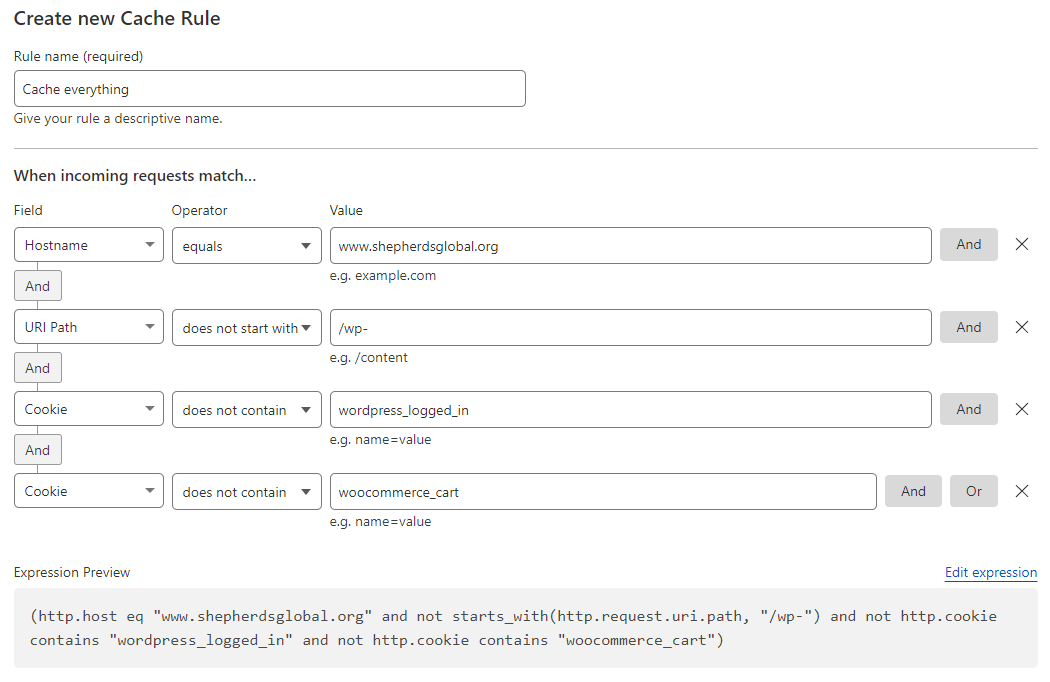
Here’s what we’re using to do full-page HTML caching. This is a Cache Rule (not a Page Rule):
Cloudflare Worker for Matomo
In order to capture clicks on PDF files that come from outside of our website (Google search results for PDF files, for example) we implemented a Cloudflare worker that captures those requests and sends a POST to our Matomo installation (i.shepherdsglobal.org) with visitor info so they’ll show up in our stats.
addEventListener('fetch', event => {

  event.respondWith(handleRequest(event.request))

})

async function handleRequest(request) {

  const url = new URL(request.url)

  // Check if the request URL ends with .pdf and is not a HEAD request and doesn't come from SGC.org
  if (url.pathname.endsWith('.pdf') && request.method !== 'HEAD' && !request.headers.get('Referer')?.includes('shepherdsglobal.org')) {

    // Check if there's a user agent, and if not, skip the API request
    // (Used to filter out some website speed tests, etc)
    const userAgent = request.headers.get('User-Agent');

    if (userAgent) {

      // Construct the API URL with parameters
      const apiUrl = new URL('<https://i.shepherdsglobal.org/js/>;');

      // Extract the filename from the URL
      const filename = url.pathname.split('/').pop();
      const referrer = request.headers.get('Referer');

      // Extract the original visitor's IP from the CF-Connecting-IP header
      const visitorIP = request.headers.get('CF-Connecting-IP');
      const acceptLanguage = request.headers.get('Accept-Language');
      const tokenAuth = 'cd51d5c02e39e708d3218b349e986be0';
      apiUrl.searchParams.append('action_name', 'Download ' + filename);
      apiUrl.searchParams.append('idsite', '1');
      apiUrl.searchParams.append('rec', '1');
      apiUrl.searchParams.append('url', url + '?src=external');
      apiUrl.searchParams.append('urlref', referrer);
      apiUrl.searchParams.append('ua', userAgent);
      apiUrl.searchParams.append('token_auth', tokenAuth);
      apiUrl.searchParams.append('cip', visitorIP);
      apiUrl.searchParams.append('lang', acceptLanguage);
      apiUrl.searchParams.append('download', url + '?src=external');

      // Make a GET request to the API
      const apiResponse = await fetch(apiUrl, {
        method: 'POST',
      })

      // Process the API response as needed
      // For example, log the response or perform some action

      console.log(apiResponse)

    }
    // Continue with the original request to serve the PDF file
    return fetch(request)
  } else {
    // If the request is not for a PDF, pass it through unmodified
    return fetch(request)
  }
}
The token_auth was generated in Matomo from the Matomo user “cfworker” which has only write access to the db.